Menu
Contact Us Free Trial
PC & MAC
Setup Guide · Desktop

Setup IPTV on PC or Mac:
Stream Easily on
Desktop & Laptop

Updated: May 2026
8 min read
NZ IPTV Team
Setup IPTV on PC or Mac

Setup IPTV on PC or Mac with ease. This guide walks you through the best free and premium players available for desktop, helping you get your NZ IPTV subscription up and running in just a few minutes. No technical experience required.

For users who want to setup IPTV on PC or Mac, there are several great players to choose from. Two of the most well‑known free and open‑source options are IPTV Smarters Pro — available both as a downloadable app and as an online browser‑based version — and MyIPTV Player, both offering a clean interface and easy setup with your NZ IPTV subscription.

For a more premium experience, players like Hotplayer, SmartOne IPTV, and IBO Player Pro deliver advanced features, smoother performance, and a more polished interface for users who want the best possible streaming experience on their desktop or laptop.

Choose your IPTV player: IPTV Smarters Pro · MyIPTV Player · IBO Player Pro · Hotplayer
Download from the Microsoft Store or Mac App Store. Alternatively, you may download these apps directly from their official websites.

Disclaimer: All third‑party applications and tools mentioned in this setup guide are the sole property of their respective developers and owners. NZ IPTV is not affiliated with, endorsed by, or responsible for any of these applications. We simply recommend them as they are widely used and compatible with our service. Always download apps from their official sources.

IPTV Smarters Pro (Open Source)

1
Download the App

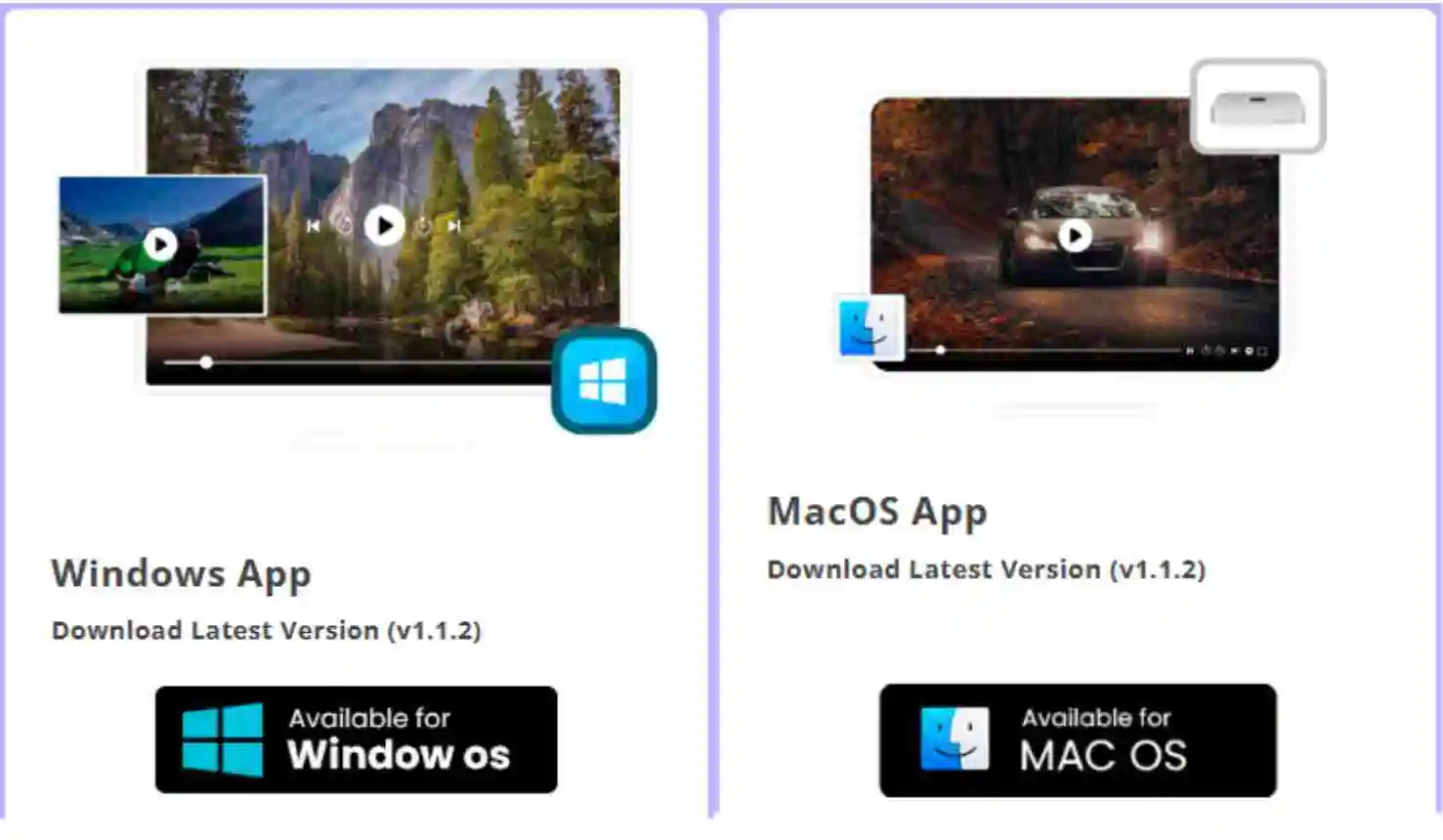
Visit the official IPTV Smarters website at www.iptvsmarters.com and navigate to the downloads section. Make sure to select the correct version for your device — Windows 32‑bit, Windows 64‑bit, or macOS. If you are unsure which version to choose, check your system settings under About This PC (Windows) or About This Mac (Mac).
NZ IPTV, IPTV New Zealand, IPTV free trial NZ, IPTV subscription NZ, best IPTV NZ, IPTV setup guide NZ, IPTV streaming NZ, IPTV apps NZ, IPTV player NZ, IPTV Xtream Codes NZ, IPTV M3U playlist NZ, IPTV login NZ, IPTV instant setup NZ, IPTV support NZ, IPTV demo NZ, IPTV trial offer NZ, IPTV premium NZ, IPTV HD streaming NZ, IPTV 4K streaming NZ, IPTV live TV NZ, IPTV sports NZ, IPTV movies NZ, IPTV entertainment NZ, IPTV VOD NZ, IPTV channels NZ, IPTV rugby NZ, IPTV cricket NZ, IPTV NRL NZ, IPTV AFL NZ, IPTV kids channels NZ, IPTV global content NZ, IPTV UK channels NZ, IPTV USA channels NZ, IPTV Canada channels NZ, IPTV Europe channels NZ, IPTV Asia channels NZ, IPTV worldwide access NZ, IPTV reseller NZ, IPTV wholesale NZ, IPTV business NZ, IPTV expansion NZ, IPTV features NZ, IPTV subscription plans NZ, IPTV best price NZ, IPTV Firestick NZ, IPTV Smart TV NZ, IPTV Android app NZ, IPTV iOS app NZ, IPTV computer setup NZ, IPTV desktop streaming NZ, IPTV software NZ, IPTV premium players NZ. IPTV Smarters download
2
Install the App

Once the installer file has finished downloading, open your Downloads folder and locate the file. Double‑click the installer and follow the on‑screen instructions to complete the installation. The process takes less than a minute. Once finished, IPTV Smarters Pro will be available on your desktop or in your Applications folder (Mac).

3
Launch & Connect

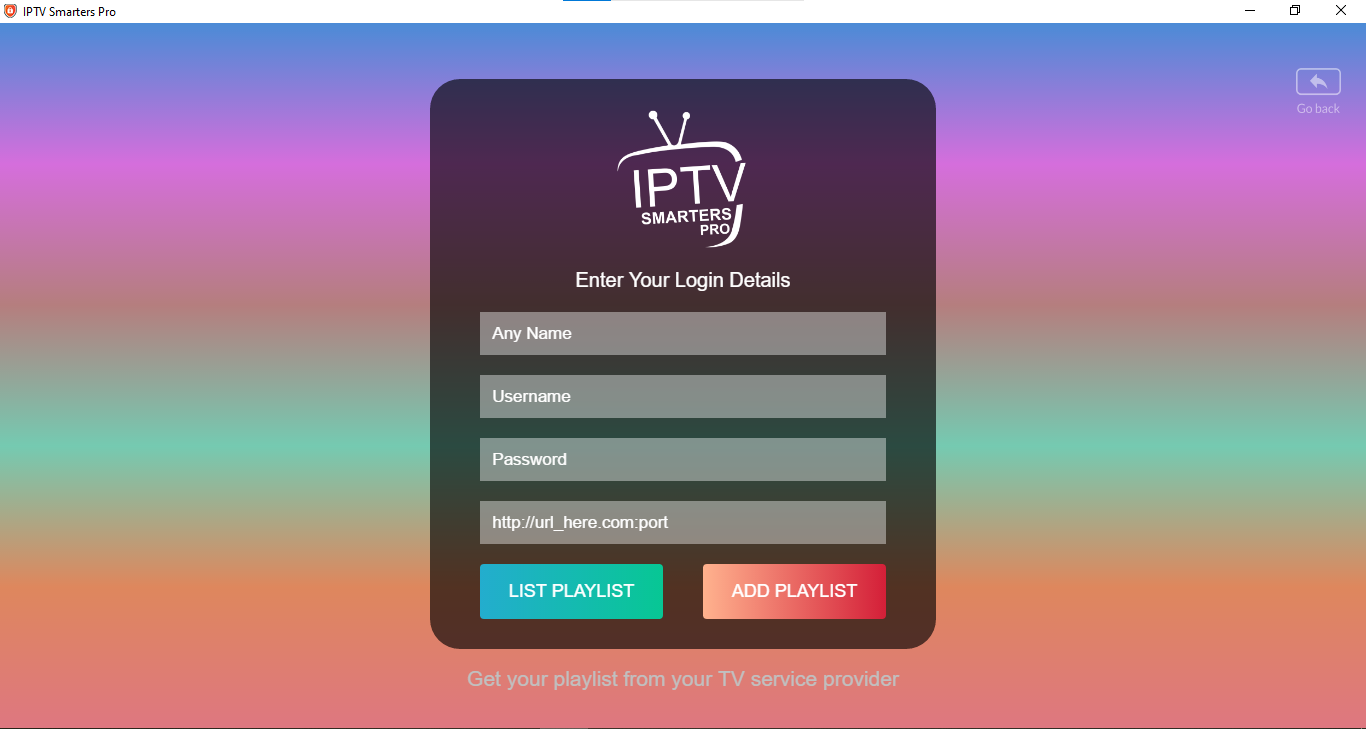
Open IPTV Smarters Pro and choose one of the following methods to connect your NZ IPTV subscription:

Login with Xtream Codes API (recommended): Enter your playlist name (NZ IPTV or any name), Username, Password, and Server URL provided by NZ IPTV, then click ADD PLAYLIST.

Make sure the URL starts with http:// — not https://. It may auto‑correct when pasting.
NZ IPTV, IPTV New Zealand, IPTV free trial NZ, IPTV subscription NZ, best IPTV NZ, IPTV setup guide NZ, IPTV streaming NZ, IPTV apps NZ, IPTV player NZ, IPTV Xtream Codes NZ, IPTV M3U playlist NZ, IPTV login NZ, IPTV instant setup NZ, IPTV support NZ, IPTV demo NZ, IPTV trial offer NZ, IPTV premium NZ, IPTV HD streaming NZ, IPTV 4K streaming NZ, IPTV live TV NZ, IPTV sports NZ, IPTV movies NZ, IPTV entertainment NZ, IPTV VOD NZ, IPTV channels NZ, IPTV rugby NZ, IPTV cricket NZ, IPTV NRL NZ, IPTV AFL NZ, IPTV kids channels NZ, IPTV global content NZ, IPTV UK channels NZ, IPTV USA channels NZ, IPTV Canada channels NZ, IPTV Europe channels NZ, IPTV Asia channels NZ, IPTV worldwide access NZ, IPTV reseller NZ, IPTV wholesale NZ, IPTV business NZ, IPTV expansion NZ, IPTV features NZ, IPTV subscription plans NZ, IPTV best price NZ, IPTV Firestick NZ, IPTV Smart TV NZ, IPTV Android app NZ, IPTV iOS app NZ, IPTV computer setup NZ, IPTV desktop streaming NZ, IPTV software NZ, IPTV premium players NZ, IPTV Smarters login

Prefer Not to Download Anything when you try to setup IPTV on PC or Mac ? You can also access the full IPTV Smarters Pro online version directly from your browser, no download, no installation required. Simply visit webtv.iptvsmarters.com, press Add Playlist and log in with your NZ IPTV credentials. You get access to all the same features, channels, and content as the desktop app, from any browser on any computer, Windows, Mac, Linux, or Chromebook. It's the quickest and most convenient way to start streaming IPTV on PC and Mac instantly. NZ IPTV, IPTV New Zealand, IPTV free trial NZ, IPTV subscription NZ, best IPTV NZ, IPTV setup guide NZ, IPTV streaming NZ, IPTV apps NZ, IPTV player NZ, IPTV Xtream Codes NZ, IPTV M3U playlist NZ, IPTV login NZ, IPTV instant setup NZ, IPTV support NZ, IPTV demo NZ, IPTV trial offer NZ, IPTV premium NZ

MyIPTV Player (Open Source)

NZ IPTV is the best IPTV subscription, best IPTV subscription NZ, IPTV New Zealand free trial, NZ IPTV premium subscription, IPTV setup guide NZ, IPTV streaming NZ, IPTV apps NZ, IPTV player NZ, IPTV Xtream Codes NZ, IPTV M3U playlist NZ, IPTV login NZ, IPTV instant activation NZ, IPTV support NZ, IPTV demo NZ, IPTV trial offer NZ, IPTV HD streaming NZ, IPTV 4K streaming NZ, IPTV live TV NZ, IPTV sports NZ, IPTV rugby NZ, IPTV cricket NZ, IPTV NRL NZ, IPTV AFL NZ, IPTV movies NZ, IPTV series NZ, IPTV entertainment NZ, IPTV VOD NZ, IPTV channels NZ, IPTV kids channels NZ, IPTV global channels NZ, IPTV UK channels NZ, IPTV USA channels NZ, IPTV Canada channels NZ, IPTV Europe channels NZ, IPTV Asia channels NZ, IPTV worldwide streaming NZ, IPTV reseller NZ, IPTV wholesale NZ, IPTV business NZ, IPTV expansion NZ, IPTV subscription plans NZ, IPTV pricing NZ, IPTV Smart TV NZ, IPTV Firestick NZ, IPTV Android TV NZ, IPTV Apple TV NZ, IPTV Mac setup NZ, IPTV PC setup NZ, IPTV VLC player NZ, IPTV Kodi NZ, IPTV MyIPTV Player NZ, IPTV premium package NZ, MyIPTV Player on Windows
1
Download & Install

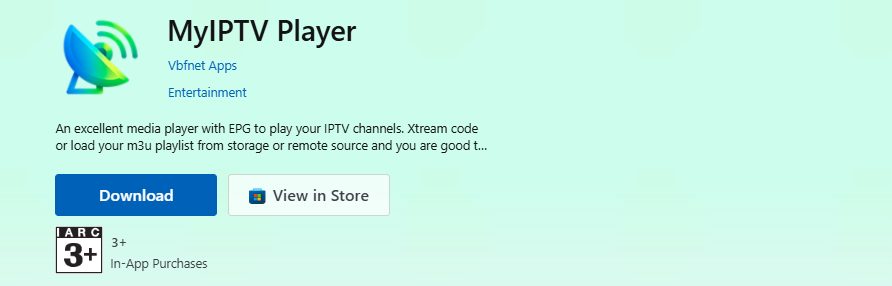
Go directly to the Microsoft Store, click Download and wait for the app to download and install. Once done, click Launch.

2
Add Your Playlist

Open the app and press Goto Settings. Select Add New Playlist, Xtream Codes and PG Source. Enter the login details provided by NZ IPTV and assign a name for easy identification. Click Add Xtream Source. NZ IPTV is the best IPTV subscription, best IPTV subscription NZ, IPTV New Zealand free trial, NZ IPTV premium subscription, IPTV setup guide NZ, IPTV streaming NZ, IPTV apps NZ, IPTV player NZ, IPTV Xtream Codes NZ, IPTV M3U playlist NZ, IPTV login NZ, IPTV instant activation NZ, IPTV support NZ, IPTV demo NZ, IPTV trial offer NZ, IPTV HD streaming NZ, IPTV 4K streaming NZ, IPTV live TV NZ, IPTV sports NZ, IPTV rugby NZ, IPTV cricket NZ, IPTV NRL NZ, IPTV AFL NZ, IPTV movies NZ, IPTV series NZ, IPTV entertainment NZ, IPTV VOD NZ, IPTV channels NZ, IPTV kids channels NZ, IPTV global channels NZ, IPTV UK channels NZ, IPTV USA channels NZ, IPTV Canada channels NZ, IPTV Europe channels NZ, IPTV Asia channels NZ, IPTV worldwide streaming NZ, IPTV reseller NZ, IPTV wholesale NZ, IPTV business NZ, IPTV expansion NZ, IPTV subscription plans NZ, IPTV pricing NZ, IPTV Smart TV NZ, IPTV Firestick NZ, IPTV Android TV NZ, IPTV Apple TV NZ, IPTV Mac setup NZ, IPTV PC setup NZ, IPTV VLC player NZ, IPTV Kodi NZ, IPTV MyIPTV Player NZ, IPTV premium package NZ, MyIPTV Player on Windows
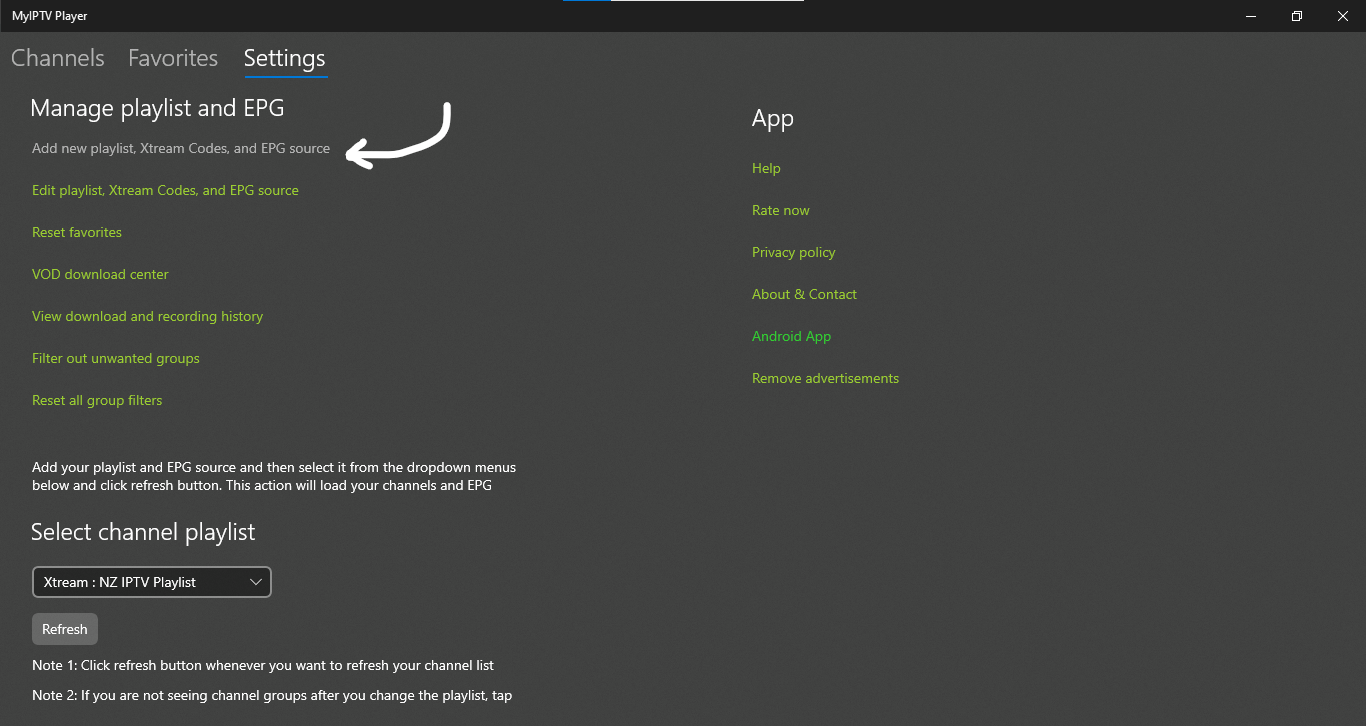
Alternatively, you can upload your playlist using the M3U URL in the Remote Channel List section. Press Add Remote List and, if available, Add EPG Source to confirm.

Make sure the URL starts with http:// — not https://.

3
Load Your Channels

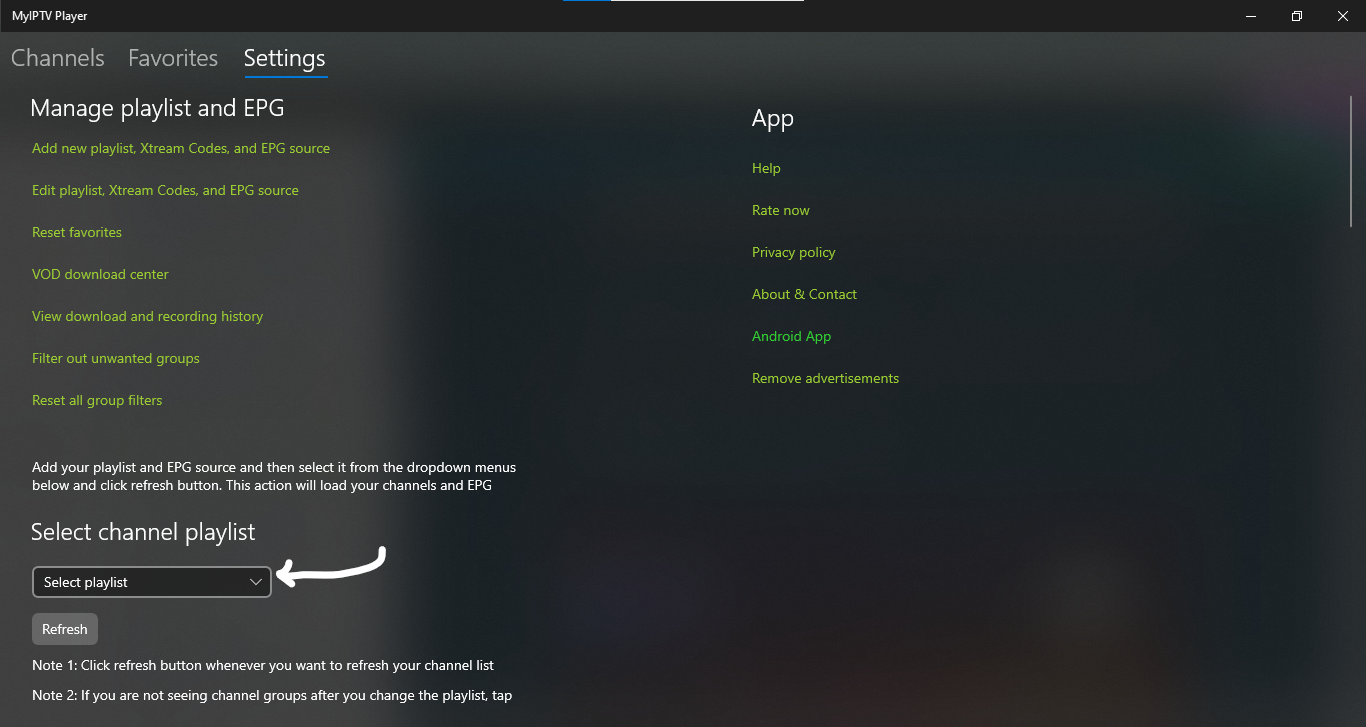
Go back to the home page, click the Select Channel Playlist, choose the playlist you just added, and hit Refresh. Your full channel list will load automatically.
NZ IPTV is the best IPTV subscription, best IPTV subscription NZ, IPTV premium streaming NZ, setup IPTV on PC or MAC, NZ IPTV is the best IPTV subscription, best IPTV subscription NZ, IPTV New Zealand free trial, NZ IPTV premium subscription, IPTV setup guide NZ, IPTV streaming NZ, IPTV apps NZ, IPTV player NZ, IPTV Xtream Codes NZ, IPTV M3U playlist NZ, IPTV login NZ, IPTV instant activation NZ, IPTV support NZ, IPTV demo NZ, IPTV trial offer NZ, IPTV HD streaming NZ, IPTV 4K streaming NZ, IPTV live TV NZ, IPTV sports NZ, IPTV rugby NZ, IPTV cricket NZ, IPTV NRL NZ, IPTV AFL NZ, IPTV movies NZ, IPTV series NZ, IPTV entertainment NZ, IPTV VOD NZ, IPTV channels NZ, IPTV kids channels NZ, IPTV global channels NZ, IPTV UK channels NZ, IPTV USA channels NZ, IPTV Canada channels NZ, IPTV Europe channels NZ, IPTV Asia channels NZ, IPTV worldwide streaming NZ, IPTV reseller NZ, IPTV wholesale NZ, IPTV business NZ, IPTV expansion NZ, IPTV subscription plans NZ, IPTV pricing NZ, IPTV Smart TV NZ, IPTV Firestick NZ, IPTV Android TV NZ, IPTV Apple TV NZ, IPTV Mac setup NZ, IPTV PC setup NZ, IPTV VLC player NZ, IPTV Kodi NZ, IPTV MyIPTV Player NZ, IPTV premium package NZ
4
Start Streaming

Click Channels (on the top left) to browse your full channel list, or click Program Guide to view the TV schedule. Double‑click on any channel to start watching instantly.

Note: MyIPTV Player is available exclusively on Windows via the Microsoft Store.

IBO Player Pro (Free 7 Days)

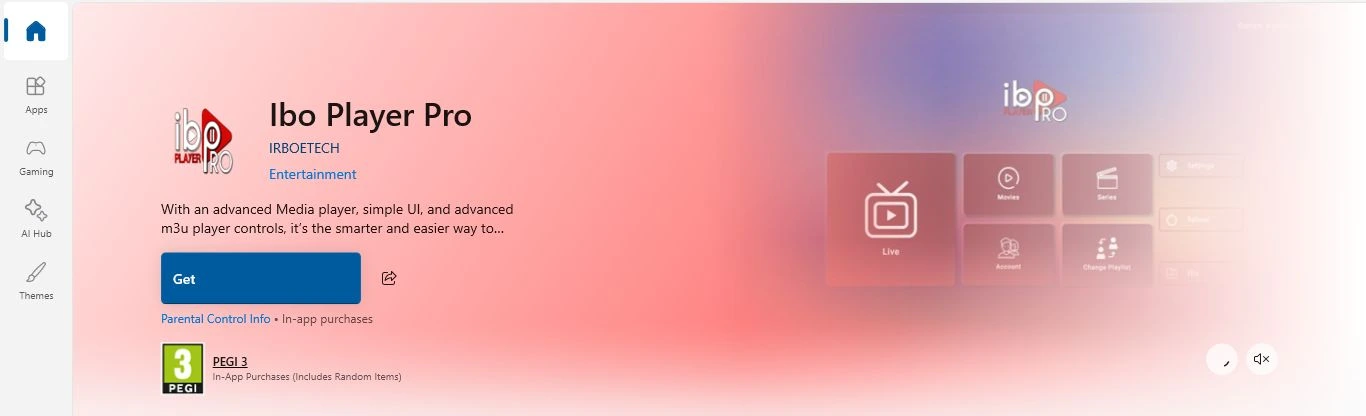
IBO Player Pro on desktop
1
Download & Install

Go directly to the Microsoft Store or Mac App Store. Click Get and wait for the app to download and install. Once done, click Launch.

2
Collect Device Credentials

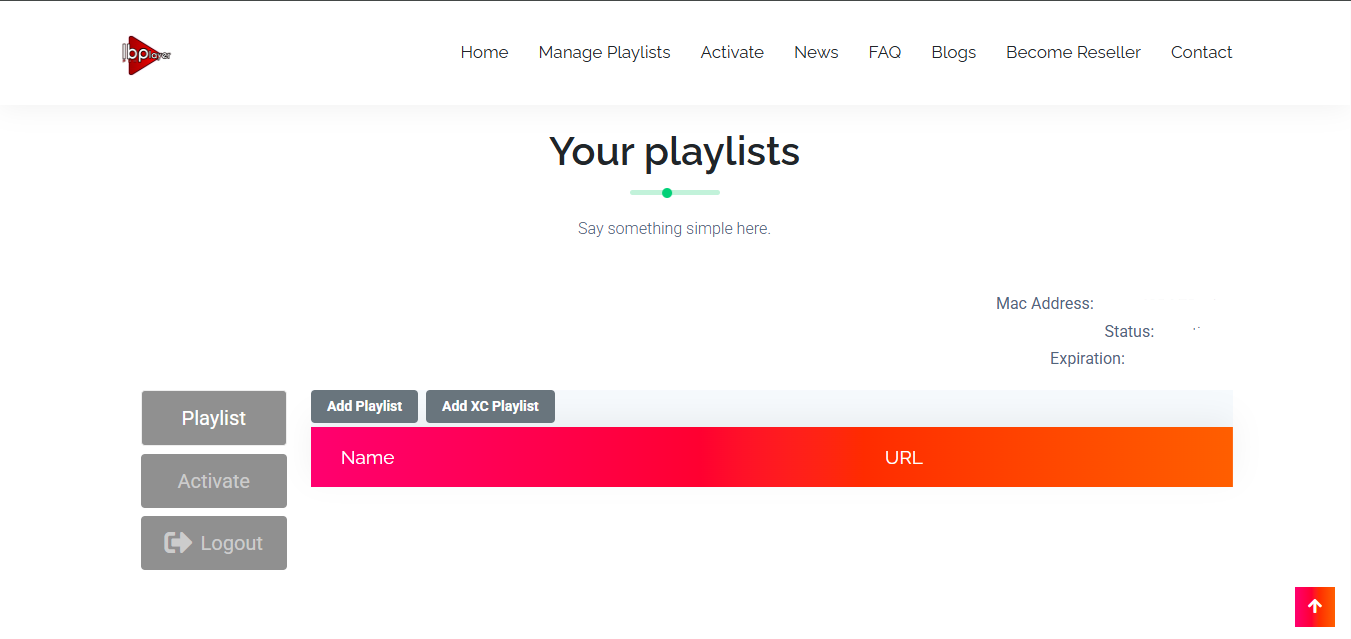
Open the app on your PC. Instead of a single MAC address, these apps typically display two important pieces of information: a MAC address and a Device Key. Copy these exactly as shown.
NZ IPTV is the best IPTV subscription, best IPTV subscription NZ, IPTV premium streaming NZ, setup IPTV on PC or MAC, NZ IPTV is the best IPTV subscription, best IPTV subscription NZ, IPTV New Zealand free trial, NZ IPTV premium subscription, IPTV setup guide NZ, IPTV streaming NZ, IPTV apps NZ, IPTV player NZ, IPTV Xtream Codes NZ, IPTV M3U playlist NZ, IPTV login NZ, IPTV instant activation NZ, IPTV support NZ, IPTV demo NZ, IPTV trial offer NZ, IPTV HD streaming NZ, IPTV 4K streaming NZ, IPTV live TV NZ, IPTV sports NZ, IPTV rugby NZ, IPTV cricket NZ, IPTV NRL NZ, IPTV AFL NZ, IPTV movies NZ, IPTV series NZ, IPTV entertainment NZ, IPTV VOD NZ, IPTV channels NZ, IPTV kids channels NZ, IPTV global channels NZ, IPTV UK channels NZ, IPTV USA channels NZ, IPTV Canada channels NZ, IPTV Europe channels NZ, IPTV Asia channels NZ, IPTV worldwide streaming NZ, IPTV reseller NZ, IPTV wholesale NZ, IPTV business NZ, IPTV expansion NZ, IPTV subscription plans NZ, IPTV pricing NZ, IPTV Smart TV NZ, IPTV Firestick NZ, IPTV Android TV NZ, IPTV Apple TV NZ, IPTV Mac setup NZ, IPTV PC setup NZ, IPTV VLC player NZ, IPTV Kodi NZ, IPTV MyIPTV Player NZ, IPTV premium package NZ, IBO Player Pro portal
3
Log In to the Web Portal

On your computer or smartphone, go to the official IBO Player Pro portal at iboplayer.pro/manage‑playlists. Enter your device's MAC address and Device Key to log in.

4
Add Your IPTV Playlist

Once logged into the portal, look for the option to "Add Playlist". Simply paste the M3U Playlist URL provided by your NZ IPTV provider.

Make sure the M3U URL starts with http:// — not https://.

5
Start Streaming

Restart the app on your device. Your channels and VOD library should now appear automatically.

For App activation, please review IBO Player Pro's pricing and activation steps here.

Hotplayer / HOT IPTV (Free 30 Days)

NZ IPTV is the best IPTV subscription, best IPTV subscription NZ, IPTV premium streaming NZ, setup IPTV on PC or MAC, NZ IPTV is the best IPTV subscription, best IPTV subscription NZ, IPTV New Zealand free trial, NZ IPTV premium subscription, IPTV setup guide NZ, IPTV streaming NZ, IPTV apps NZ, IPTV player NZ, IPTV Xtream Codes NZ, IPTV M3U playlist NZ, IPTV login NZ, IPTV instant activation NZ, IPTV support NZ, IPTV demo NZ, IPTV trial offer NZ, IPTV HD streaming NZ, IPTV 4K streaming NZ, IPTV live TV NZ, IPTV sports NZ, IPTV rugby NZ, IPTV cricket NZ, IPTV NRL NZ, IPTV AFL NZ, IPTV movies NZ, IPTV series NZ, IPTV entertainment NZ, IPTV VOD NZ, IPTV channels NZ, IPTV kids channels NZ, IPTV global channels NZ, IPTV UK channels NZ, IPTV USA channels NZ, IPTV Canada channels NZ, IPTV Europe channels NZ, IPTV Asia channels NZ, IPTV worldwide streaming NZ, IPTV reseller NZ, IPTV wholesale NZ, IPTV business NZ, IPTV expansion NZ, IPTV subscription plans NZ, IPTV pricing NZ, IPTV Smart TV NZ, IPTV Firestick NZ, IPTV Android TV NZ, IPTV Apple TV NZ, IPTV Mac setup NZ, IPTV PC setup NZ, IPTV VLC player NZ, IPTV Kodi NZ, IPTV MyIPTV Player NZ, IPTV premium package NZ, Hotplayer on desktop, setup IPTV on PC or MAC
1
Download the App

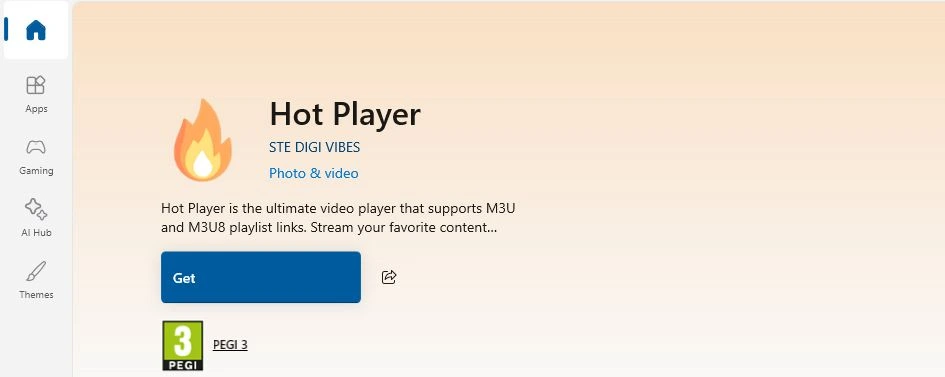
Go directly to the Microsoft Store or Mac App Store. Click Get and wait for the app to download and install. Once done, click Launch.

2
Open the App & Get Your MAC Address

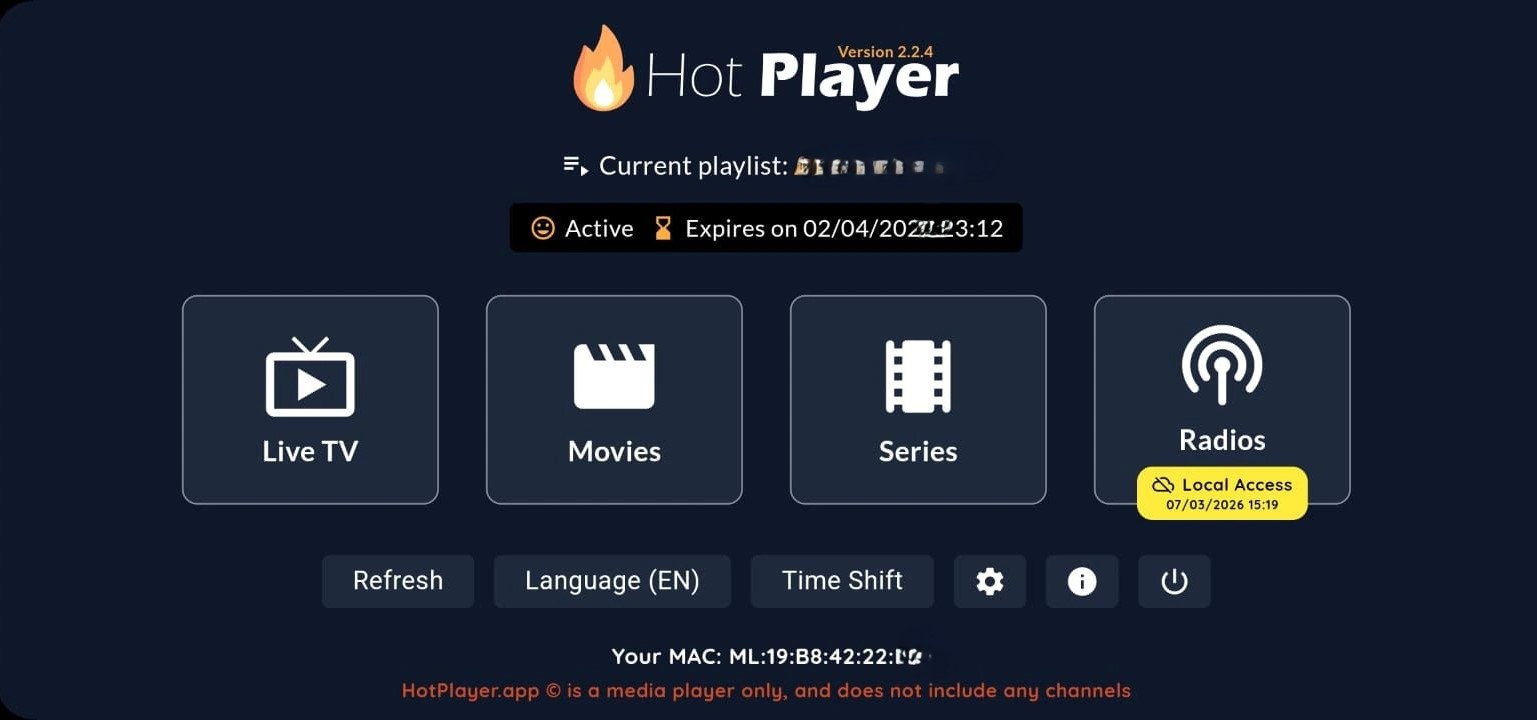
Launch the Hotplayer app on your device. On the main screen, note down the MAC address displayed — this is unique to your device.
NZ IPTV is the best IPTV subscription, best IPTV subscription NZ, IPTV premium streaming NZ, setup IPTV on PC or MAC, NZ IPTV is the best IPTV subscription, best IPTV subscription NZ, IPTV New Zealand free trial, NZ IPTV premium subscription, IPTV setup guide NZ, IPTV streaming NZ, IPTV apps NZ, IPTV player NZ, IPTV Xtream Codes NZ, IPTV M3U playlist NZ, IPTV login NZ, IPTV instant activation NZ, IPTV support NZ, IPTV demo NZ, IPTV trial offer NZ, IPTV HD streaming NZ, IPTV 4K streaming NZ, IPTV live TV NZ, IPTV sports NZ, IPTV rugby NZ, IPTV cricket NZ, IPTV NRL NZ, IPTV AFL NZ, IPTV movies NZ, IPTV series NZ, IPTV entertainment NZ, IPTV VOD NZ, IPTV channels NZ, IPTV kids channels NZ, IPTV global channels NZ, IPTV UK channels NZ, IPTV USA channels NZ, IPTV Canada channels NZ, IPTV Europe channels NZ, IPTV Asia channels NZ, IPTV worldwide streaming NZ, IPTV reseller NZ, IPTV wholesale NZ, IPTV business NZ, IPTV expansion NZ, IPTV subscription plans NZ, IPTV pricing NZ, IPTV Smart TV NZ, IPTV Firestick NZ, IPTV Android TV NZ, IPTV Apple TV NZ, IPTV Mac setup NZ, IPTV PC setup NZ, IPTV VLC player NZ, IPTV Kodi NZ, IPTV MyIPTV Player NZ, IPTV premium package NZ, Hotplayer MAC address, setup IPTV on PC or MAC
3
Visit the Official Hotplayer Website

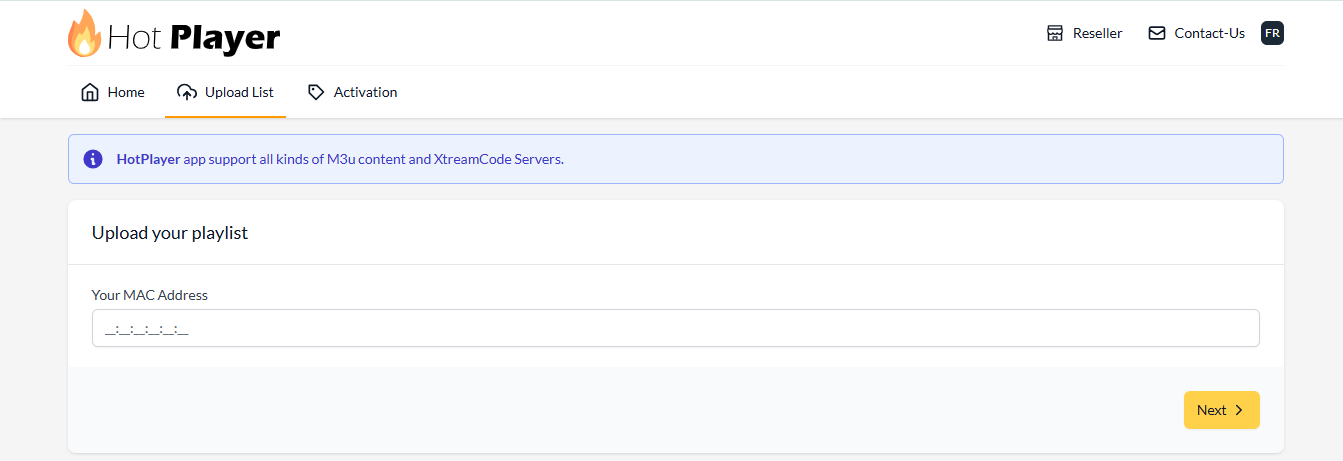
On your phone or computer, go to hotplayer.app/upload.
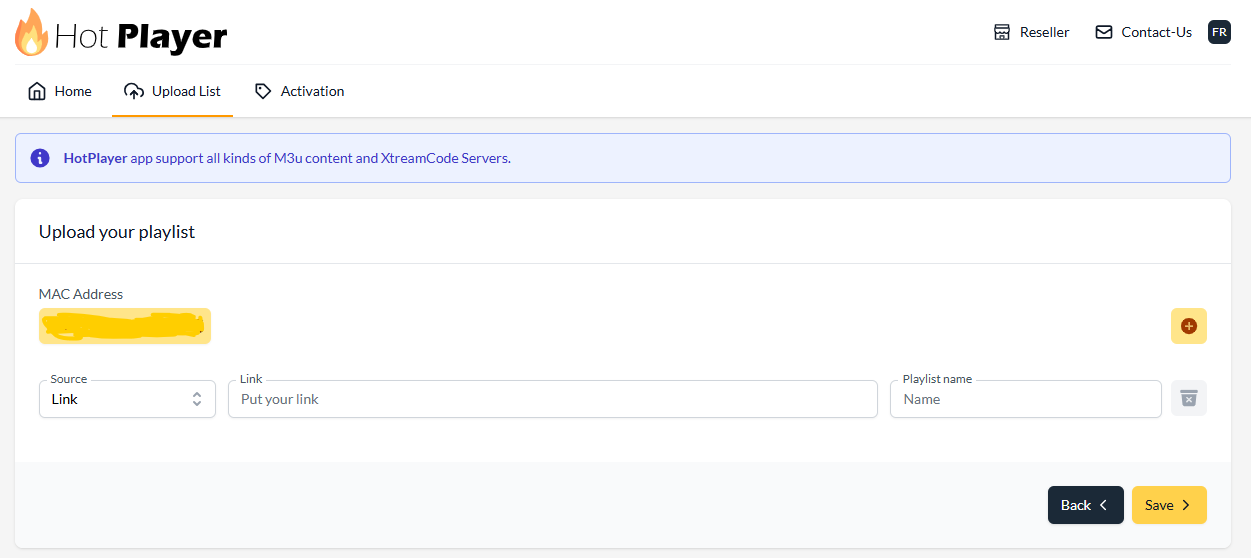
Hotplayer upload portal
4
Enter Your Details

In the upload form, enter your MAC address (from your app screen) and press Next. Paste your M3U Playlist URL provided by NZ IPTV and name your playlist (e.g. NZ IPTV).

Make sure the URL starts with http:// — not https://.

Hotplayer login details
5
Save & Restart

Click Save. Restart the Hotplayer app on your PC or Mac. Your channels and VOD library should now appear automatically.

For App activation, please review Hotplayer's pricing and activation steps here.

Important Notes

The players listed above are our top recommendations to setup IPTV on PC or Mac easily , but many other options are available. You can find additional IPTV players directly on the Microsoft Store, the Mac App Store, or from their official websites. The setup process is the same across most players — simply enter your Xtream Codes credentials (Server URL, Username, and Password) or paste your M3U URL and you're good to go.

If any player requests unfamiliar information such as an EPG URL, a portal URL, or a MAC address, just contact our support team via WhatsApp or Email and we'll provide everything you need instantly.

Always download IPTV Players from the official website to avoid unsafe files. Ensure your PC/Mac has a stable internet connection (minimum 20 Mbps recommended). NZ IPTV provides login credentials only — the app itself must be installed separately. For troubleshooting or compatibility issues, contact NZ IPTV Support.

PC & Mac Help

IPTV Troubleshooting on PC & Mac

Find and fix the most common IPTV issues while you setup IPTV on PC or Mac.

Streaming

Video keeps buffering or freezing

  • 1Run a speed test — you need at least 20 Mbps for HD, 50+ Mbps for 4K.
  • 2Switch from Wi-Fi to a wired Ethernet cable — this alone eliminates most buffering.
  • 3Close other bandwidth-heavy apps (downloads, video calls, game updates).
  • 4Lower the stream quality inside your player settings temporarily.
  • 5Restart your router and try again.
If buffering only affects specific channels, those streams may be temporarily overloaded. Try switching to a backup stream or contact NZ IPTV Support.
Setup & login

Wrong credentials — playlist won't load

  • 1Double-check your Username, Password, and Server URL exactly as sent by NZ IPTV — no extra spaces.
  • 2Make sure the URL starts with http://, not https:// — some apps auto-correct this.
  • 3Copy-paste credentials directly from your activation email instead of typing manually.
  • 4Delete the existing playlist and re-add it from scratch.
Credentials are case-sensitive. A single capital letter in the wrong place will block access.
Streaming

Channels load but video won't play

  • 1Try a different channel — if others work, the issue is that specific stream.
  • 2Update your IPTV player app to the latest version.
  • 3Check if your antivirus or firewall is blocking the stream — try temporarily disabling it.
  • 4Switch to a different player to rule out a codec issue.
  • 5Clear the app cache or reinstall the player.
App & player

IPTV Smarters Pro won't install on Mac

  • 1Download the macOS version from iptvsmarters.com — not the Windows installer.
  • 2If macOS blocks the app, go to System Settings → Privacy & Security and click "Open Anyway".
  • 3Make sure you are running macOS 11 Big Sur or later.
  • 4Alternatively, use the browser version at webtv.iptvsmarters.com — no install needed.
Speed & quality

Picture quality is blurry or pixelated

  • 1Open player settings and set the stream quality to HD or 4K — some players default to SD.
  • 2Check your internet speed — HD needs at least 10 Mbps, 4K needs 25–50 Mbps.
  • 3Make sure no other devices are consuming bandwidth simultaneously.
  • 4Use a wired Ethernet connection for the most stable quality.
HD and 4K streams depend on both your connection and the channel source. Live sports may temporarily downgrade quality during peak loads.
Setup & login

App asks for a MAC address or portal URL

  • 1Hotplayer and IBO Player Pro display a unique MAC address on their home screen — note it down.
  • 2Visit the player's web portal and log in using that MAC address.
  • 3Paste your M3U playlist URL provided by NZ IPTV into the portal.
  • 4If you don't have your M3U URL, contact NZ IPTV Support — we'll send it instantly.
App & player

App crashes or closes unexpectedly

  • 1Restart the app and your computer.
  • 2Check for an app update in the Microsoft Store or Mac App Store.
  • 3Reinstall the player — uninstall completely first, then download fresh from the official source.
  • 4Ensure your operating system is up to date — outdated OS versions cause compatibility crashes.
  • 5Try a different player to rule out an app-specific issue.
Speed & quality

Audio is out of sync with the video

  • 1Pause the stream for 5–10 seconds, then resume — this often re-syncs the buffer.
  • 2Stop the stream completely, wait 10 seconds, and press play again.
  • 3In IPTV Smarters, check Player Settings for an audio offset/sync option.
  • 4Switch to a different stream link for the same channel if your player offers multiple.
Persistent audio sync issues on live channels are usually server-side. If the problem continues, contact NZ IPTV Support.
Setup & login

Channels missing or EPG not showing

  • 1Go to your player's playlist settings and press Refresh or Update channels.
  • 2Delete the playlist and re-add it using your Xtream Codes credentials or M3U URL.
  • 3EPG may take a few minutes to fully load after adding your playlist — wait and refresh.
  • 4If channels are still missing, your subscription may have expired — contact NZ IPTV Support.

Still having an issue trying to setup IPTV on PC or Mac? We're here.

Our support team replies instantly via WhatsApp. Send us a message and we'll get you streaming in minutes — no waiting, no bots.

Contact support
PC & Mac Setup

Frequently Asked Questions

Everything you need to know before you setup IPTV on PC or Mac

What is the best IPTV player to setup IPTV on PC or Mac?
The best free options are IPTV Smarters Pro and MyIPTV Player — both easy to set up with your NZ IPTV credentials. For a more premium experience, IBO Player Pro (7-day free trial) and Hotplayer (30-day free trial) offer a polished interface and smoother performance. All four players are fully compatible with your NZ IPTV subscription.
WindowsIs MyIPTV Player available on Mac?
No — MyIPTV Player is only available on Windows via the Microsoft Store. If you are on a Mac, we recommend using IPTV Smarters Pro (downloadable from iptvsmarters.com), IBO Player Pro, or Hotplayer, all of which are available on both Windows and macOS.
Do I need to install anything to stream IPTV on my computer?
No! You can stream directly from your browser using the IPTV Smarters Pro web version at webtv.iptvsmarters.com — no download or installation needed. Simply add your playlist and log in with your NZ IPTV credentials. This works on Windows, Mac, Linux, and Chromebook.
What login details do I need to setup IPTV on PC or Mac?
For most players using Xtream Codes login, you will need three things provided by NZ IPTV:

Server URL
Username
Password

For players like Hotplayer and IBO Player Pro that use a MAC address method, you will also need your M3U playlist URL. All credentials are sent to you instantly after your subscription is activated. If you need help, contact us via WhatsApp.
Why does my IPTV URL need to start with http:// and not https://?
IPTV streaming servers typically operate on http:// rather than https://. Some apps or browsers may automatically change it to https:// when you paste the URL — if this happens, simply change it back to http:// manually before saving. Using the wrong protocol will result in a connection error or empty playlist.
How much internet speed do I need to stream IPTV on a PC or Mac?
We recommend a minimum of 20 Mbps for a smooth HD streaming experience. For 4K streaming, a connection of 50 Mbps or above is ideal. A wired (Ethernet) connection will always outperform Wi-Fi for stability, if you experience buffering, try connecting your PC directly to your router.
Mac & PCMy channels loaded but videos won't play — what's wrong?
If your channel list loads but nothing plays, try these steps:

1. Check your internet connection — run a speed test.
2. Confirm the Server URL starts with http://, not https://.
3. Restart the app and try a different channel to rule out a single stream issue.
4. Try switching to a different IPTV player.
5. If the problem persists, contact NZ IPTV Support via WhatsApp — our team responds fast and will fix it for you instantly.
Are IBO Player Pro and Hotplayer free?
IBO Player Pro offers a free 7-day trial, after which a paid activation is required. Hotplayer offers a generous free 30-day trial. Both are premium apps with advanced features and a more polished experience than the free open-source players. For pricing and activation details, visit their respective official websites. Your NZ IPTV subscription cost is completely separate from the player app costs.
Can I use the same NZ IPTV subscription on multiple devices?
Each NZ IPTV subscription is for one active stream at a time. You can install the player on multiple devices, but only one device can stream simultaneously per subscription. If you need to stream on multiple screens at the same time, you can purchase additional connections. Contact us via WhatsApp or visit our complete pricing page for multi-connection pricing.
I don't see a section in the app for EPG or a portal URL — is that okay?
Yes, that's perfectly fine. EPG (Electronic Programme Guide) and portal URLs are optional fields in most players — you do not need them to stream. Simply enter your Xtream Codes credentials (Server URL, Username, Password) or M3U URL and your channels will load. If any app requests additional details you don't have, contact NZ IPTV Support via WhatsApp and we'll provide everything instantly.