Firestick
vs
Chromecast
Brutally Honest 10-Point Comparison
Two giants. One winner. We put Firestick vs Chromecast head-to-head on every metric that matters for New Zealand households — price, performance, IPTV support, and long-term value.
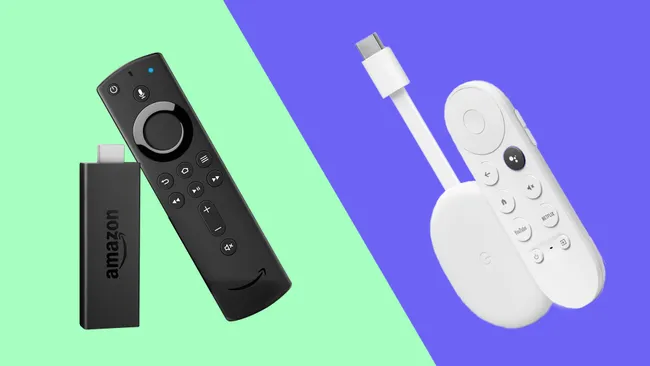
Fire TV Stick 4K Max
- 2GHz MediaTek MT8696T
- 2GB RAM · 16GB Storage
- Wi-Fi 6E (802.11ax)
- Dolby Vision · Dolby Atmos
- Alexa Voice Remote
- Fire OS (Android fork)
Chromecast with Google TV (4K)
- 1.9GHz Amlogic S905D3
- 2GB RAM · 8GB Storage
- Wi-Fi 5 (802.11ac)
- Dolby Vision · Dolby Atmos
- Google Assistant / Gemini
- Google TV (Android)
The Firestick vs Chromecast debate is one of the most popular streaming comparisons in New Zealand in 2026. Both cost about NZ$99, plug into your TV's HDMI port, and deliver 4K streaming across all major apps. The differences matter though — especially for IPTV users, smart home setups, or those needing more than Netflix and Prime Video.
Good news before we start: NZ-IPTV is fully compatible with both devices. Whichever you choose, your subscription works perfectly on it.
Firestick vs Chromecast Price & Value in New Zealand
Fire TV Stick 4K Max
Available at ~NZ$99 from Amazon, Noel Leeming, and PB Tech. Amazon regularly discounts Fire Sticks during Prime Day and Boxing Day — sometimes dropping to NZ$49–59. The basic Fire Stick HD starts at around NZ$59.
Chromecast with Google TV (4K)
Also ~NZ$99 at Noel Leeming, PB Tech, and Harvey Norman. The HD version sits at around NZ$59. Both 4K flagship models land at essentially identical price points for New Zealand buyers.
Firestick Hardware & Performance
Fire TV Stick 4K Max
Runs a 2GHz MediaTek MT8696T with 2GB RAM and 16GB storage. The 4K Max also supports Wi-Fi 6E — giving it a significant edge in homes with a compatible router. 16GB storage means more apps installed at once.
Chromecast with Google TV (4K)
Uses a 1.9GHz Amlogic S905D3 with 2GB RAM but only 8GB storage (effectively 5GB usable). Wi-Fi 5 only — no Wi-Fi 6E. For most New Zealand households both perform similarly day-to-day, but Firestick has a measurable spec advantage.
Chromecast OS & Interface
Fire OS
Fire OS is Amazon's Android fork — fast and functional with multiple user profiles. However, the home screen heavily prioritises Amazon Prime Video and paid content suggestions, which many New Zealand users find intrusive and commercial.
Google TV
Google TV aggregates content across all your subscriptions in a unified, personalised interface. Cleaner recommendations, broader content discovery, and a more neutral home screen. Gemini AI assistant is arriving in New Zealand in 2026 for Google TV devices.
App Library & New Zealand Streaming Apps
Amazon Appstore
10,000+ apps including Netflix, Disney+, Neon, Prime Video, TVNZ+, ThreeNow, Sky Go, and YouTube. Supports APK sideloading — install IPTV players like TiviMate and Hotplayer via the Downloader app.
Google Play Store
Covers all major New Zealand apps — Netflix, Disney+, Neon, Prime Video, TVNZ+, ThreeNow, Sky Go. Google Play is generally larger with more app options. IPTV apps like TiviMate are available directly from the store — no sideloading needed. APK sideloading also supported.
IPTV Compatibility — NZ-IPTV
Via APK Sideloading
Install Downloader from the Amazon Appstore. Use it to install Hotplayer or TiviMate. Enter your NZ-IPTV M3U URL or Xtream Codes — you're live instantly. Works flawlessly on all Fire OS Android-based models.
Via Google Play Store
Install TiviMate or IBO Player Pro directly from the Google Play Store — no sideloading required. Enter your NZ-IPTV credentials and stream immediately. Arguably simpler than the Firestick setup process.
- Open Settings → My Fire TV → Developer Options → Enable Apps from Unknown Sources
- Search Appstore for Downloader — install it
- Open Downloader → enter the TiviMate or Hotplayer APK URL → install
- Open the IPTV app → Add Playlist → enter your NZ-IPTV M3U URL or Xtream Codes
- Channels load automatically — browse and enjoy 40,000+ live channels
- Open Google Play Store on your Chromecast with Google TV
- Search for TiviMate or IBO Player Pro — install directly, no sideloading
- Open the app → Add Playlist → enter your NZ-IPTV M3U URL or Xtream Codes
- Channels load automatically — browse and enjoy 40,000+ live channels
Voice Control & Smart Home : Firestick vs Chromecast
Alexa Voice Remote
Dedicated Alexa remote with live TV controls. If your New Zealand home already uses Alexa smart speakers or Echo devices, the Firestick integrates seamlessly. Strong choice for Amazon Prime households.
Google Assistant / Gemini Remote
If your household uses Google Home, Nest speakers, or Android phones, this integration is more natural. Voice search pulls from more services. Gemini AI arriving in New Zealand adds a significant long-term advantage.
4K Picture Quality
4K · Dolby Vision · HDR10+
Supports 4K Ultra HD, HDR10, HDR10+, HLG, Dolby Vision, and Dolby Atmos audio. Excellent picture quality on any modern 4K TV. NZ-IPTV 4K channels stream crisply with no issues on a stable fibre connection.
4K · Dolby Vision · HDR10+
Also supports 4K, HDR10, HDR10+, HLG, Dolby Vision, and Dolby Atmos. In direct tests, the Chromecast's picture processing is noted as slightly ahead — though the difference is negligible for most New Zealand viewers.
Chromecast Wins Screen Casting
Miracast
Supports Miracast screen mirroring — works at the device level with Android phones and Windows laptops. Compatible with fewer apps natively, making it less seamless for New Zealand households with mixed devices.
Google Cast
Google Cast is app-level casting — supported natively by YouTube, Netflix, Spotify, Chrome browser, and hundreds of New Zealand apps. Cast from your Android or iPhone without mirroring the whole screen. Far more polished for New Zealand households.
Firestick Wins Gaming
Xbox Game Pass + Amazon Luna
Supports Xbox Game Pass cloud gaming and Amazon Luna natively. Compatible with Xbox controllers via Bluetooth. If cloud gaming is part of your New Zealand household's entertainment mix, Firestick is the clear choice.
Limited Gaming
Google's Stadia platform was discontinued. Chromecast supports some games via the Play Store but lacks the dedicated cloud gaming integration of the Firestick. For casual New Zealand gaming, both are fine — for serious cloud gamers, Firestick wins.
Chromecast Wins Long-Term Support
Vega OS Risk ⚠️
Amazon has confirmed future Fire TV Sticks will run Vega OS — a locked platform that does not support APK sideloading or IPTV apps. Current Android-based Fire Sticks remain safe, but the long-term trajectory for IPTV users is concerning.
Open Platform ✅
Google TV has a clear long-term roadmap including Gemini AI integration arriving in New Zealand in 2026. No equivalent of the Vega OS lockdown is planned. Google's open approach means your IPTV freedoms are not at risk.
Firestick vs Chromecast — New Zealand 2026
Complete Firestick vs Chromecast Spec Table
| Specification | Fire TV 4K Max | Chromecast 4K | Winner |
|---|---|---|---|
| Price (NZD) | ~NZ$99 | ~NZ$99 | Tie |
| Processor | 2.0GHz MediaTek | 1.9GHz Amlogic | Firestick |
| RAM | 2GB | 2GB | Tie |
| Storage | 16GB | 8GB (5GB usable) | Firestick |
| Wi-Fi | Wi-Fi 6E | Wi-Fi 5 | Firestick |
| 4K / Dolby Vision | ✔ Yes | ✔ Yes | Tie |
| Dolby Atmos | ✔ Yes | ✔ Yes | Tie |
| Operating System | Fire OS | Google TV | Chromecast |
| Voice Assistant | Alexa | Google / Gemini | Ecosystem |
| App Store | Amazon Appstore | Google Play | Chromecast |
| IPTV Apps (TiviMate) | Via APK sideload | Google Play Store | Chromecast |
| NZ-IPTV Compatible | ✔ Yes | ✔ Yes | Both ✅ |
| Casting Technology | Miracast | Google Cast | Chromecast |
| Cloud Gaming | Xbox + Luna | Limited | Firestick |
| Vega OS Lockdown Risk | ⚠️ Future models | ✅ No risk | Chromecast |
| Available in New Zealand | Amazon, Noel Leeming, PB Tech | Noel Leeming, PB Tech | Both |
Who Should Buy Which Device?
Choose Firestick 4K Max if…
- You are an Amazon Prime subscriber
- You have a Wi-Fi 6E router at home
- You play Xbox Game Pass cloud games on your TV
- You already have Alexa or Echo devices
- You need maximum local storage for apps
- You are comfortable sideloading APKs for IPTV
Choose Chromecast Google TV if…
- You use Android phones, Google Home, or Nest
- You want IPTV apps from Google Play directly
- You cast regularly from your phone or laptop
- You want the cleanest, most neutral interface
- Long-term IPTV platform safety matters to you
- You want Gemini AI features coming in 2026–2027
Frequently Asked Questions
Verdict — Firestick vs Chromecast for New Zealanders in 2026
In 2026, Chromecast with Google TV stands out as the better long-term choice for most New Zealand households, especially IPTV users who value simple setup and strong platform safety. No sideloading needed, no Vega OS risk, and Gemini AI on the horizon.
The Fire TV Stick 4K Max remains excellent for Amazon Prime subscribers, Alexa households, and cloud gamers — with real hardware advantages like extra storage and Wi-Fi 6E.
NZ-IPTV — Compatible with Both Devices
Firestick or Chromecast — your NZ-IPTV subscription works on both. 40,000+ channels, 4K quality, 20K+ VOD. Free 24h trial available. All priced in NZD.